


Building Software: A Construction Process
Creating software is straightforward. Whether it’s a website or a mobile application, the key is in how it’s constructed. Similar to building a house or a laptop, software is a product that needs to meet certain construction techniques. Developing a web page or a mobile application involves several steps, leading to a technically and design-wise correct product without compromising client needs.
1. Initial Mandatory Requirements:
A. Product Owner and Stakeholders
- Create the “As is” process map;
- Map the flow/process to observe, understand, and eliminate wasted time (e.g., waiting time for approval, reporting, for security reasons);
- Review and adjust the “As is” process map based on changes and process standardization;
- Create the “To be” process map.
B. Planning
B.1. Project Kick-off & Sprint 0
(Scrum Master, Product Owner, stakeholders, and/or end-users)
- Provide a project summary and create a project breakdown;
- Define technologies and non-functional tasks;
- Define the development process, elaborate on functional parts (MVP), and prioritize them.
B.2. Product Owner, Stakeholders, and/or End-User
- Create a list of requirements based on the “To be” process map;
- Ensure each requirement meets INVEST criteria;
- Define a “Done” definition for each requirement;
- Create the product backlog;
- Allocate points to each requirement to prioritize them (from high value to low value);
- Use the template “As a (user) I want (feature) so that (business benefits)” to have enough details to convert each requirement into a User Story;
- Based on priorities, create the project details map (Backbones, Walking Skeletons, and the user stories list using the MoSCoW approach).
2. Development and Testing (at Sprint Level)
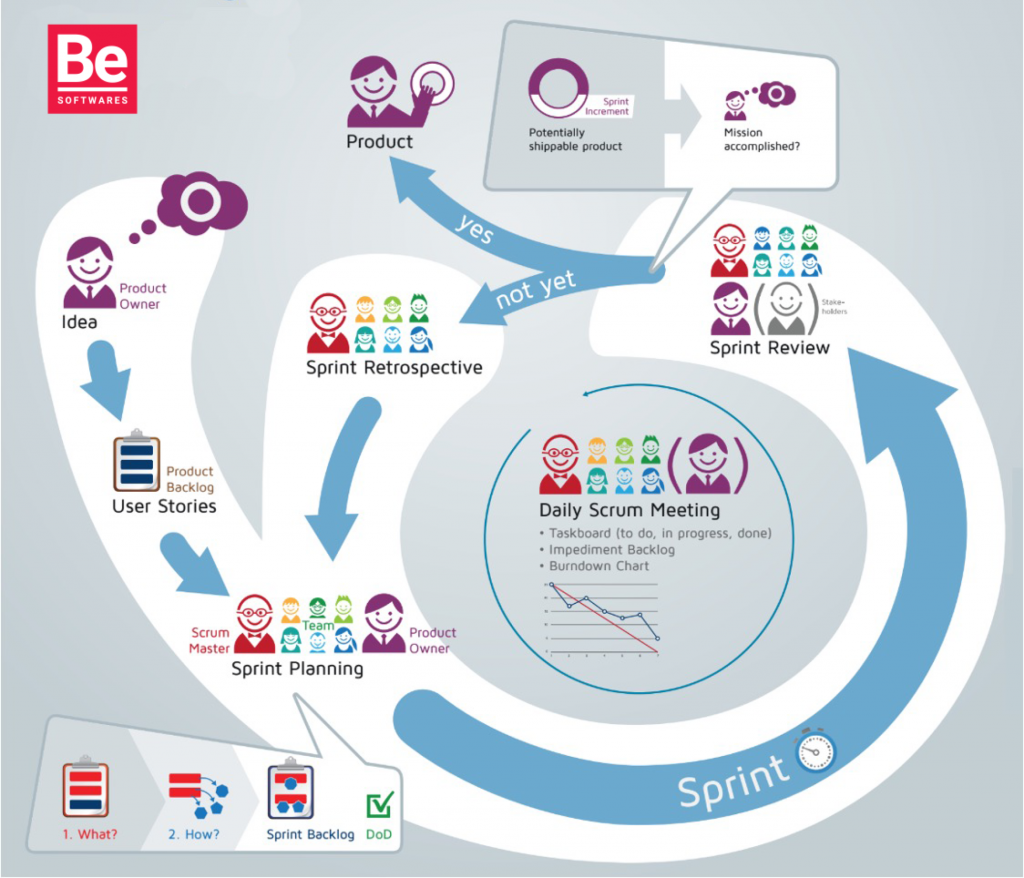
A. Product Owner and Development Team – Sprint Planning
- Based on project details, prioritize user specifications to be included in the first Sprints – considering high-value and high-risk user stories;
- Product owner should have all details about user specifications to be included in the next Sprint (step-by-step workflow – work instructions – with screenshots and all relevant details) to support the development team;
- Before each Sprint Planning session, the Product Owner (and Scrum Master) fine-tune the Backlog.
B. Scrum Master and Development Team – Daily Scrum
- Discuss progress, encountered impediments, and what will be done/next steps.
C. Product Owner, Development Team, Stakeholders, and/or End-User – Sprint Review
- Demonstrate/Test the product/MVP developed during the sprint;
- Use the feedback received from stakeholders and/or end-users to reprioritize the backlog (optional);
- Confirm the increase – if user deposits made during the sprint can be considered “Done”.
D. Development Team and Scrum Master – Sprint Retrospective
- Discuss gained experiences and improvement areas.
Note:
- After 3 Sprints, the cadence and WIP can be defined so the Scrum Master can estimate, based on the team’s velocity chart, the deadline for completing the product;
- Create a cumulative flow diagram to monitor work time vs. cycle time (as an improvement area);
- The Product Owner can cancel a Sprint only if necessary – in this case, the Sprint goal is modified;
- The Product Owner should always have all the project details from the current Sprint. Otherwise, a face-to-face discussion between the Product Owner or developer and the end-user will take place to understand project details;
- The Product Owner ensures that the product backlog is updated correctly.
3. Integration
A. Development Team
- Test project details integration and fix errors.
4. UAT – User Acceptance Test
A. Product Owner, End-User, and Development Team
The end-user and/or Product Owner evaluate project details, test the product, and send confirmation to the development team.
5. Implementation
A. Product Owner, End-User, and Development Team
Instructions about the project sent to the client.
Note:
- Project details: “Done” means developed, documented, and tested;
- Releases: “Done” means no major defects or change requests remain;
- Final project deliverables: prioritized features implemented (equivalent to two sprints without errors, meeting the end-user satisfaction score).
Legend:
As is = moment T0
To be = moment T1
Done = completed
Backlog
Work time = measures the time from when the client requests the project until they receive the deliverable
Cycle time = measures the time the development team works to fulfill what the client requested
- Written by: BeSoftwares
- Posted on: September 3, 2021
- Tags: Agile methodology, Mobile Development, Scrum, Software, Web Development